Spring Cloud Gateway 간단한 실습
Spring CloudGateway란?
Spring CloudGateway란 외부 클라이언트에게서 받은 요청을 라우팅하여 내부의 특정 서비스로(마이크로 서비스) 전달한다. 그리고 보안,로깅,필터링,로깅 제어 같은 공통 처리를 처리할 수 있게 도와주는 서비스이다.
외부클라이언트를 CloudGateway를 바라보며 통신을 하고, CloudGateway은 클라이언트와 내부 서비스를 바라보며 통신을 한다.
- 외부 클라이언트
- 브라우저, 모바일 앱, 외부 API 소비자 등이 오직 Cloud Gateway만 바라보고 요청을 보냄.
- 내부 서비스 주소는 노출되지 않는다.
- Spring Cloud Gateway
- 클라이언트와 내부 서비스 사이의 중간 관문 역할은 한다.
- 요청을 받아서 라우팅 규칙에 따라 해당 마이크로서비스로 전달.( .yml 파일에서 설정 가능)
- 동시에 인증(JWT 검증), 로깅, Rate Limiting, CORS 처리 같은 공통 정책을 수행.
- 내부 서비스 (마이크로서비스)
- Gateway 뒤에 숨어 있어서 외부에 직접 노출되지 않음.
- Gateway로부터 온 요청만 처리.
- 서비스끼리 직접 통신할 수도 있지만, 외부 요청은 Gateway를 통해서만 들어옴.
예시 다이어그램
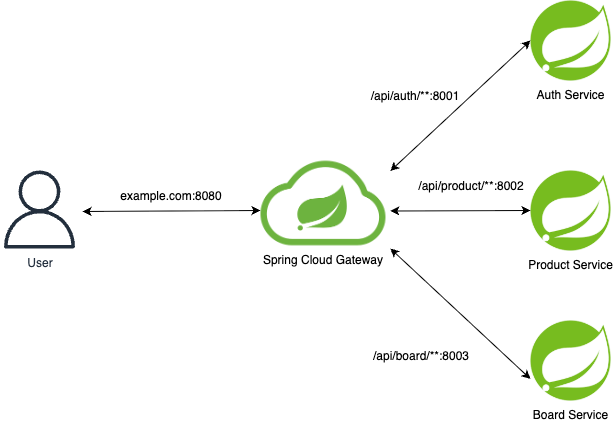
실습
시나리오
- Client가 localhost:8080/api/member 로 request를 날림 → Gateway가 이 요청을 localhost:8000/api/member (Member Service)로 라우팅함 → Member Service가 응답 반환을 함
- Client가 localhost:8080/api/product 로 request를 날림 → Gateway가 이 요청을 localhost:8001/api/product (Product Service)로 라우팅함 → Member Service가 응답 반환을 함
서버를 총 3개(API Gateway Server, Member Service, Product Service) 띄어서 라우팅이 잘 되는지 확인해보자
실습 환경
- Java 버전:
17 - Spring Boot 버전:
3.5.6 - Spring Cloud 버전:
2025.0.0
Member Service 서버 생성하기
테스트용으로 간단하게만 생성하자
본 실습은 3개의 Spring프로젝트를 생성하여 진행한다.
의존성 설정
1
2
3
4
5
6
7
dependencies {
    implementation 'org.springframework.boot:spring-boot-starter-web'
    compileOnly 'org.projectlombok:lombok'
    annotationProcessor 'org.projectlombok:lombok'
    testImplementation 'org.springframework.boot:spring-boot-starter-test'
    testRuntimeOnly 'org.junit.platform:junit-platform-launcher'
}
application.yml
1
2
server:
  port: 8000
application.yml 파일도 서버포트만 설정해줬다.
MemberController.java
1
2
3
4
5
6
7
8
9
10
11
12
13
14
15
package com.sung_1.demomsa_member.controller;

import org.springframework.web.bind.annotation.GetMapping;
import org.springframework.web.bind.annotation.RequestMapping;
import org.springframework.web.bind.annotation.RestController;

@RestController
@RequestMapping("/api/member")
public class MemberController {
    @GetMapping("")
    public String test(){
        return "MSA : Member Server";
    }
}
Product Service 서버 생성하기
Product Service 서버 또한 테스트용으로 간단하게만 생성하자
의존성 설정
1
2
3
4
5
6
7
dependencies {
    implementation 'org.springframework.boot:spring-boot-starter-web'
    compileOnly 'org.projectlombok:lombok'
    annotationProcessor 'org.projectlombok:lombok'
    testImplementation 'org.springframework.boot:spring-boot-starter-test'
    testRuntimeOnly 'org.junit.platform:junit-platform-launcher'
}
application.yml
1
2
server:
  port: 8001
위와 동일하게 application.yml 파일도 서버포트만 설정해주면 된다.
MemberController.java
1
2
3
4
5
6
7
8
9
10
11
12
13
14
15
package com.sung_1.demomsa_product.controller;

import org.springframework.web.bind.annotation.GetMapping;
import org.springframework.web.bind.annotation.RequestMapping;
import org.springframework.web.bind.annotation.RestController;

@RestController
@RequestMapping("/api/product")
public class ProductController {
    @GetMapping
    public String test(){
        return "MSA : Product Server";
    }
}
Api Gateway 서버 생성하기
의존성 설정
1
2
3
4
5
6
7
8
dependencies {
    implementation 'org.springframework.boot:spring-boot-starter-webflux'
    implementation 'org.springframework.cloud:spring-cloud-starter-gateway-server-webflux'
    compileOnly 'org.projectlombok:lombok'
    annotationProcessor 'org.projectlombok:lombok'
    testImplementation 'org.springframework.boot:spring-boot-starter-test'
    testRuntimeOnly 'org.junit.platform:junit-platform-launcher'
}
API Gateway server는 webflux 로 설정했다.
application.yml
1
2
3
4
5
6
7
8
9
10
11
12
13
14
15
16
17
18
19
20
21
22
23
24
25
26
server:
  port: 8080 #이 SpringBoot에 할당한 port 번호
spring:
  application:
    name: cloud-gateway
  cloud:
    gateway:
      server:
        webflux:
          #Routing
          routes:
            - id : member #회원 server
              uri : http://localhost:8000 #라우팅할 서비스의 목적지 주소
              predicates:
                - Path=/api/member #경로 검사
                - After=2020-01-01T00:00:00+08:00[Asia/Seoul] #이 시간대 이후에 들어오는 요청을 라우팅
            - id : product #상품 서버
              uri : http://localhost:8001 #라우팅할 서비스의 목적지 주
              predicates:
                - Path=/api/product #경로 검사
                - After=2020-01-01T00:00:00+08:00[Asia/Seoul] #이 시간대 이후에 들어오는 요청을 라우팅
logging: # 로그 찍어보기
  level:
    reactor:
      netty: INFO
    org.springframework.cloud.gateway: DEBUG
테스트 및 결과
3개의 서버에 대한 설정을 마쳤으면 전부 실행해보자.
API Gateway 서버에서 에러가 난다면 URI, path에 오타가 없는지 확인해 보자. 문제가 없다면 아래와 같은 로그가 찍히면서 다른 서비스 서버와 연결이 성공할 것이다.
1
2
3
4
5
6
7
8
Netty started on port 8080 (http)
2025-09-30T15:52:54.192+09:00 DEBUG 57977 --- [cloud-gateway] [           main] o.s.c.g.r.RouteDefinitionRouteLocator    : RouteDefinition member applying {_genkey_0=/api/member} to Path
2025-09-30T15:52:54.202+09:00 DEBUG 57977 --- [cloud-gateway] [           main] o.s.c.g.r.RouteDefinitionRouteLocator    : RouteDefinition member applying {_genkey_0=2020-01-01T00:00:00+08:00[Asia/Seoul]} to After
2025-09-30T15:52:54.212+09:00 DEBUG 57977 --- [cloud-gateway] [           main] o.s.c.g.r.RouteDefinitionRouteLocator    : RouteDefinition matched: member
2025-09-30T15:52:54.212+09:00 DEBUG 57977 --- [cloud-gateway] [           main] o.s.c.g.r.RouteDefinitionRouteLocator    : RouteDefinition product applying {_genkey_0=/api/product} to Path
2025-09-30T15:52:54.213+09:00 DEBUG 57977 --- [cloud-gateway] [           main] o.s.c.g.r.RouteDefinitionRouteLocator    : RouteDefinition product applying {_genkey_0=2020-01-01T00:00:00+08:00[Asia/Seoul]} to After
2025-09-30T15:52:54.213+09:00 DEBUG 57977 --- [cloud-gateway] [           main] o.s.c.g.r.RouteDefinitionRouteLocator    : RouteDefinition matched: product
2025-09-30T15:52:54.217+09:00  INFO 57977 --- [cloud-gateway] [           main] com.sung_1.demomsa.DemoMsaApplication    : Started DemoMsaApplication in 1.617 seconds (process running for 2.003)
그러면 실제로 라우팅이 잘 진행되는지 실험해보자
터미널을 열고 다음과 같은 명령어를 입력해보자
- Command
1
curl localhost:8080/api/member
- Result
1
MSA : Member Server%
그러면 본인은 분명 8080의 포트에 요청을 했지만, 8000 포트에 할당 되어 있는 서버로 부터 응답을 받았다. 그러면 api/member 로도 요청을 보내보자
- Command
1
curl localhost:8080/api/product
- Result
1
MSA : Product Server%
결과가 잘 나오는 것을 확인할 수 있다. 지금의 API Server는 인증, 보안에 대한 설정 없이 단순히 라우팅만을 담당하고 있다. Spring Cloud Gateway에서 공통된 설정에 대한 것은 어떻게 다루는지 좀 더 공부해서 적용해봐야겠다.