Terraform으로 EC2와 RDS 연결하기
Terraform으로 EC2와 RDS 연결하기
Aws web으로 정보 확인하기
aws configure을 사용하여 사용자 인증을 진행해야하는데 이름 위해서는 다음과 같은 정보가 필요하다.
Aws Aceess KeyAWS Secret Access KeyRegion NameOutput format
Aws Acess Key와 Aws Secret Access Key는 Aws Web Console에서 확인 가능하다. IAM Identity center -> 사용자 -> 사용자 추가를 누른다. 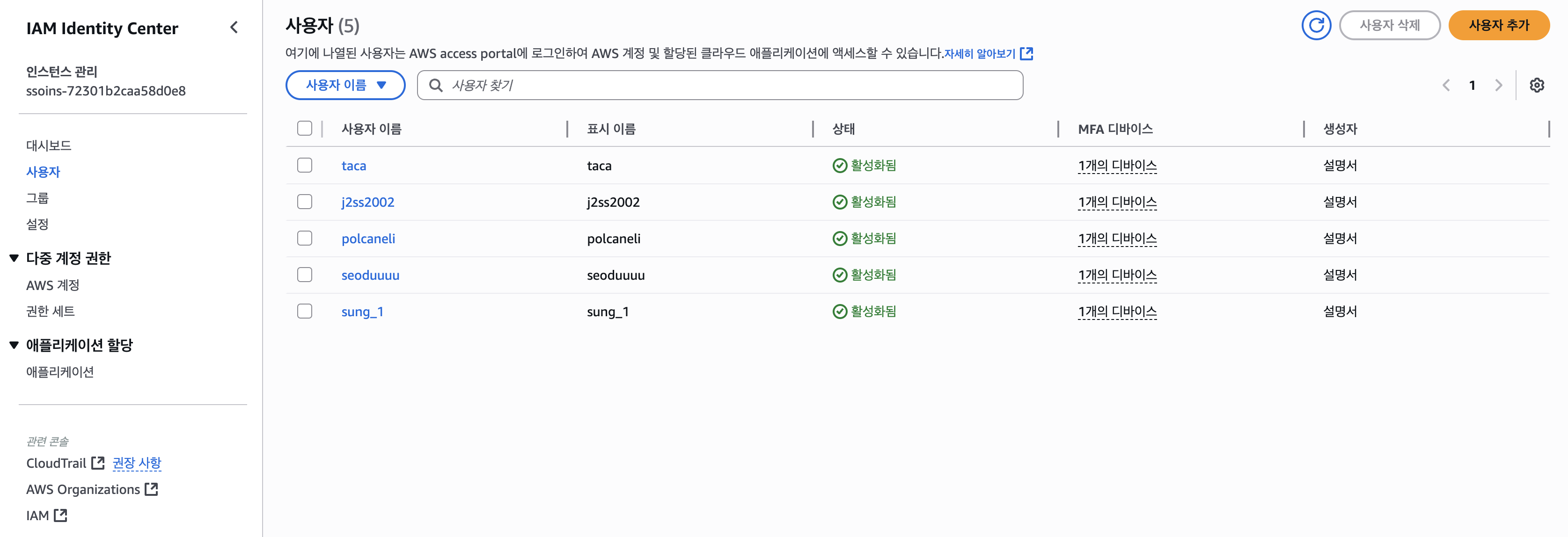 기본 정보 입력 하면 입력한 Email로 AWS부터 메일이 온다. 혹은, aws access portal에 접속하면
 AdministratorAccess|액세스 키 레이블이 나오는데 엑세스 키를 클릭하면 다음과 같은 UI가 나온다. 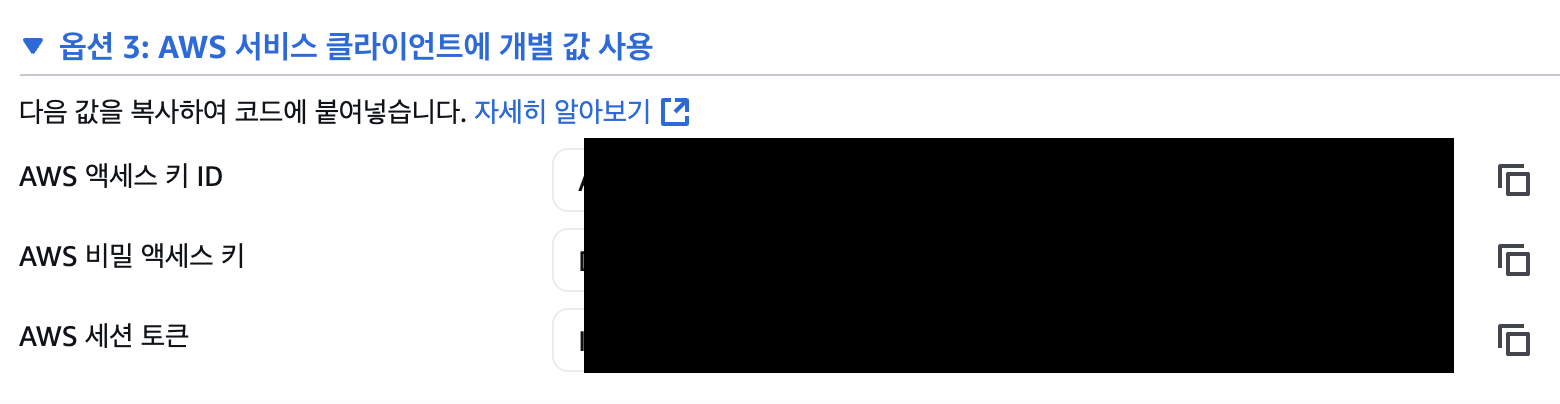 필요한 정보는 맨 밑에 존재한다.
Aws configure 설정
aws console 명령어를 사용하기 위해
🖥️ macOS (Intel & Apple Silicon 공통)
1
brew install awscli
설치 확인
1
aws --version
출력 예시
1
aws-cli/2.16.7 Python/3.11.6 Darwin/23.5.0 source arm64
📁 Directory Tree
1
2
3
4
terraform-ec2-rds-free-tier/
├── main.tf
├── variables.tf
├── outputs.tf
📄 main.tf
1
2
3
4
5
6
7
8
9
10
11
12
13
14
15
16
17
18
19
20
21
22
23
24
25
26
27
28
29
30
31
32
33
34
35
36
37
38
39
40
41
42
43
44
45
46
47
48
49
50
51
52
53
54
55
56
57
58
59
60
61
62
63
64
65
66
67
68
69
70
71
72
73
74
75
76
77
78
79
80
81
82
83
84
85
86
87
88
89
90
91
92
93
94
95
96
97
98
99
100
101
102
103
104
105
106
107
108
109
110
111
112
113
114
115
116
117
118
119
120
121
122
provider "aws" {
  region = var.aws_region
}

# VPC
resource "aws_vpc" "main" {
  cidr_block = "10.0.0.0/16"
}

resource "aws_internet_gateway" "igw" {
  vpc_id = aws_vpc.main.id
}

resource "aws_subnet" "public_subnet" {
  vpc_id                  = aws_vpc.main.id
  cidr_block              = "10.0.1.0/24"
  map_public_ip_on_launch = true
  availability_zone       = "${var.aws_region}a"
}

resource "aws_route_table" "public_rt" {
  vpc_id = aws_vpc.main.id
}

resource "aws_route" "internet_access" {
  route_table_id         = aws_route_table.public_rt.id
  destination_cidr_block = "0.0.0.0/0"
  gateway_id             = aws_internet_gateway.igw.id
}

resource "aws_route_table_association" "public_assoc" {
  subnet_id      = aws_subnet.public_subnet.id
  route_table_id = aws_route_table.public_rt.id
}

# EC2 보안 그룹
resource "aws_security_group" "ec2_sg" {
  name   = "ec2_sg"
  vpc_id = aws_vpc.main.id

  ingress {
    description = "SSH"
    from_port   = 22
    to_port     = 22
    protocol    = "tcp"
    cidr_blocks = ["0.0.0.0/0"] # 프로덕션에서는 위험함
  }

  egress {
    from_port   = 0
    to_port     = 0
    protocol    = "-1"
    cidr_blocks = ["0.0.0.0/0"]
  }
}

# RDS 보안 그룹 (EC2만 접근 가능)
resource "aws_security_group" "rds_sg" {
  name   = "rds_sg"
  vpc_id = aws_vpc.main.id

  ingress {
    from_port       = 5432
    to_port         = 5432
    protocol        = "tcp"
    security_groups = [aws_security_group.ec2_sg.id]
  }

  egress {
    from_port   = 0
    to_port     = 0
    protocol    = "-1"
    cidr_blocks = ["0.0.0.0/0"]
  }
}

# 키페어
resource "aws_key_pair" "main" {
  key_name   = "terraform-key"
  public_key = file(var.public_key_path)
}

# EC2
resource "aws_instance" "ec2" {
  ami                    = var.ec2_ami
  instance_type          = "t2.micro"
  subnet_id              = aws_subnet.public_subnet.id
  key_name               = aws_key_pair.main.key_name
  vpc_security_group_ids = [aws_security_group.ec2_sg.id]

  associate_public_ip_address = true

  tags = {
    Name = "FreeTier-EC2"
  }
}

# RDS Subnet Group (1개만 사용)
resource "aws_db_subnet_group" "rds_subnet_group" {
  name       = "rds-subnet-group"
  subnet_ids = [aws_subnet.public_subnet.id]
}

# RDS
resource "aws_db_instance" "rds" {
  identifier             = "free-tier-db"
  engine                 = "postgres"
  instance_class         = "db.t3.micro"
  allocated_storage      = 20
  db_subnet_group_name   = aws_db_subnet_group.rds_subnet_group.name
  vpc_security_group_ids = [aws_security_group.rds_sg.id]

  db_name       = var.rds_db_name
  username      = var.rds_username
  password      = var.rds_password
  skip_final_snapshot = true
  publicly_accessible = false # 외부에서는 접근 불가 (EC2만 가능)

  tags = {
    Name = "FreeTier-RDS"
  }
}
📄 variables.tf
1
2
3
4
5
6
7
8
9
10
11
12
13
14
15
16
17
18
19
20
21
22
23
24
25
variable "aws_region" {
  default = "ap-northeast-2"
}

variable "ec2_ami" {
  description = "Ubuntu 22.04 LTS AMI ID for ap-northeast-2"
  default     = "ami-0ed99df77a82560e6"
}

variable "rds_db_name" {
  default = "mydb"
}

variable "rds_username" {
  default = "postgres"
}

variable "rds_password" {
  description = "RDS 비밀번호 (주의: 민감 정보)"
  sensitive   = true
}

variable "public_key_path" {
  default = "~/.ssh/id_rsa.pub"
}
📄 outputs.tf
1
2
3
4
5
6
7
output "ec2_public_ip" {
  value = aws_instance.ec2.public_ip
}

output "rds_endpoint" {
  value = aws_db_instance.rds.endpoint
}
🧪 실행방법
1
2
terraform init
terraform apply
이 기사는 저작권자의 CC BY 4.0 라이센스를 따릅니다.